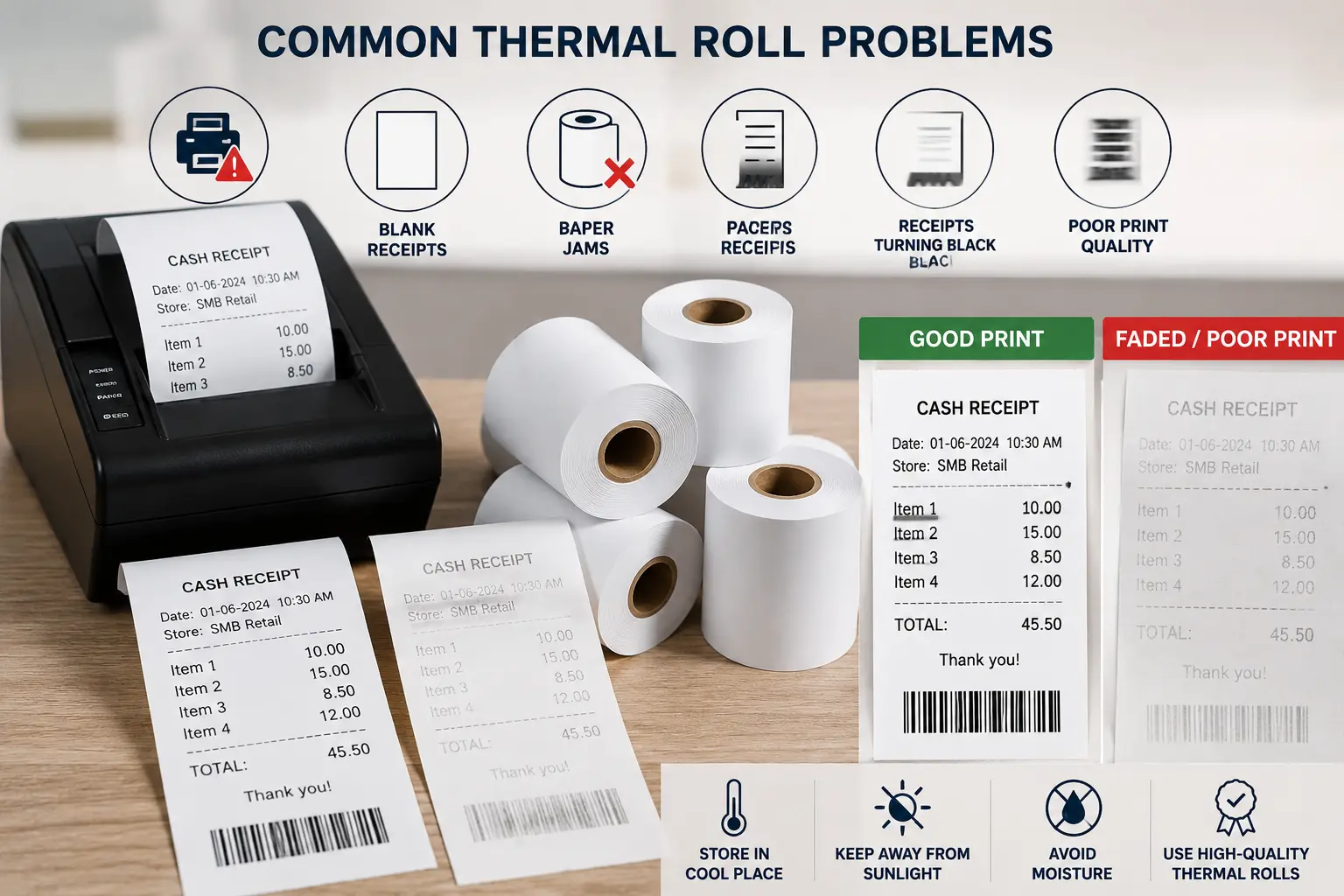
Thermal rolls are widely used in retail stores, supermarkets, restaurants, pharmacies, and other businesses that rely on receipt printers. While thermal rolls offer fast and efficient printing, poor-quality paper or improper handling can lead to printing issues that affect business operations.
Understanding the most common thermal roll problems and how to avoid them can help businesses improve print quality, reduce downtime, and extend the life of their receipt printers.
Why Thermal Roll Quality Matters
Thermal rolls play an important role in receipt printing. Poor-quality thermal paper can result in faded receipts, paper jams, and printer performance issues.
Using high-quality thermal rolls helps businesses:
- Improve print clarity
- Reduce printer maintenance
- Prevent paper-related issues
- Ensure receipts remain readable
Businesses that depend on receipt printing should always choose thermal paper that matches their printer specifications.
Common Thermal Roll Problems
Faded Receipt Printing
One of the most common issues is faded receipts that become difficult to read over time.
Causes
- Low-quality thermal paper
- Exposure to sunlight
- Excessive heat
- Long-term storage
How to Avoid It
- Use premium-quality thermal rolls
- Store paper away from direct sunlight
- Keep rolls in a cool, dry environment
Blank Receipts
Sometimes receipt printers produce completely blank receipts even though the printer appears to be working correctly.
Causes
- Incorrect paper installation
- Thermal side facing the wrong direction
- Poor-quality paper coating
How to Avoid It
- Check roll orientation before printing
- Use compatible thermal paper
- Purchase thermal rolls from reliable suppliers
Paper Jams
Paper jams can slow operations and increase printer maintenance requirements.
Causes
- Incorrect roll size
- Damaged paper edges
- Low-quality paper material
How to Avoid It
- Use the correct roll dimensions
- Replace damaged rolls
- Keep the printer clean
Receipts Turning Black
Thermal paper reacts to heat. Excessive exposure can cause receipts to darken or become unreadable.
Causes
- Direct sunlight
- High temperatures
- Contact with hot surfaces
How to Avoid It
- Store thermal rolls properly
- Avoid placing receipts near heat sources
- Keep paper away from windows and direct sunlight
Poor Print Quality
Some receipts may appear unclear, patchy, or difficult to read.
Causes
- Dirty print head
- Low-quality thermal paper
- Incorrect printer settings
How to Avoid It
- Clean the printer regularly
- Use quality thermal paper
- Verify printer settings
How to Store Thermal Rolls Properly
Proper storage helps maintain paper quality and improves receipt readability.
Best Practices
- Store rolls in a cool, dry place
- Avoid direct sunlight
- Protect paper from moisture
- Keep rolls in their original packaging until use
Following these simple steps can significantly improve the lifespan of thermal paper.
How to Choose High-Quality Thermal Rolls
Selecting the right thermal paper helps reduce printing issues and improve performance.
Consider Paper Quality
High-quality paper provides better print clarity and longer-lasting receipts.
Check Roll Size
Always choose roll dimensions that match your printer specifications.
Verify Printer Compatibility
Different printers may require different thermal roll sizes.
Buy From Reliable Suppliers
Choosing premium thermal rolls helps improve print clarity and reduce common receipt printing issues.
Tips to Improve Receipt Print Quality
Businesses can improve receipt quality by following a few simple practices.
Clean the Print Head
Regular cleaning helps maintain clear printing.
Use Quality Thermal Paper
Better paper quality improves readability and reduces maintenance issues.
Check Printer Settings
Verify print density and paper settings for optimal results.
Use Reliable Equipment
Using a dependable receipt printer and high-quality paper helps ensure clear and consistent printing results.
When Should You Replace Thermal Rolls?
Thermal rolls should be replaced when:
- Receipts become difficult to read
- Paper is damaged
- Frequent paper jams occur
- Print quality declines
Replacing paper at the right time helps maintain efficient operations and customer satisfaction.
FAQs – Frequently Asked Questions
Q1. Why are my thermal roll receipts fading?
Ans – Low-quality paper, heat exposure, and improper storage can cause receipt fading.
Q2. Why is my receipt printer printing blank receipts?
Ans – Incorrect paper installation or poor thermal coating may result in blank receipts.
Q3. Can sunlight damage thermal rolls?
Ans – Yes, direct sunlight can darken thermal paper and reduce print quality.
Q4. How should thermal rolls be stored?
Ans – Thermal rolls should be stored in a cool, dry place away from heat, sunlight, and moisture.
Q5. Do thermal rolls affect printer performance?
Ans – Yes, poor-quality thermal paper can contribute to paper jams, unclear printing, and increased printer maintenance.
Conclusion
Thermal rolls play a vital role in receipt printing, and paper quality directly affects print clarity and printer performance. Understanding common thermal roll problems and following proper storage and handling practices can help businesses reduce printing issues and improve daily operations.
SMB Infotech provides high-quality thermal rolls and printing solutions designed to support reliable and efficient receipt printing for businesses across various industries.